PDF to DXF R12 converter for older CAD and CAM
Drop a PDF below and download a DXF R12 file (AC1009): lines, polylines and text on one layer per colour, the format older CAD, CAM, laser and CNC programs read without asking questions.
Updated 1 November 2026
Drop a PDF here or click to choose one
Converted on your device. Nothing is uploaded. Several PDFs at once with the batch pass.
PDFs to convert (every page of each, at paper size, one DXF per PDF in a ZIP):
This PDF to DXF R12 converter writes every file in DXF Release 12, the AutoCAD format from 1992 with the version code AC1009. It is the oldest DXF version still in everyday use, and it is the one a plasma table, a laser cutter or a CAM package from the early 2000s opens without an error message. The conversion runs in your browser, so the part drawing never leaves your computer.
PDF to DXF R12 for a CAM job in three steps
- 1Drop the PDFthe preview shows the page; 1:1 part drawings need no scale
- 2Match the unitsmillimetres or inches, the same unit your CAM program assumes
- 3Download the R12 DXFone layer per colour, so cut, hole and engrave lines stay apart
Why do older CAM and CNC programs need DXF R12?
DXF has changed with every AutoCAD release since R12. AutoCAD R14 (1997) added the lightweight polyline (LWPOLYLINE), AutoCAD 2000 added more header settings, and later versions added objects such as multileaders and annotative styles. A program that was written to read R12 knows none of those, and when it meets an entity it does not recognise it skips it or refuses the whole file.
An R12 file avoids the problem by using only the entities that every reader understands. Here is what the converter writes:
| In the PDF | In the R12 DXF | Layer |
|---|---|---|
| Straight line | LINE | PDF_ plus the stroke colour, such as PDF_FF0000 |
| Path, rectangle, closed outline | POLYLINE with VERTEX points (the R12 polyline) | PDF_ plus the stroke colour |
| Curve, circle, rounded corner | POLYLINE, 12 straight segments per curve | PDF_ plus the stroke colour |
| Filled area | Closed POLYLINE | PDF_FILL_ plus the fill colour |
| Text | TEXT with height and angle | PDF_TEXT |
| Dashed line | Solid line (one linetype, CONTINUOUS) | Same as its colour |
| Photo or logo inside a vector PDF | Left out |
Each layer gets the nearest AutoCAD colour number, so red lines arrive red and blue lines arrive blue in any viewer. That colour coding is what makes R12 practical for CAM: one layer per colour means one layer per operation.
What does an R12 file look like for a real part?
We drew a test part for this page: a 160 x 90 mm steel bracket at 1:1 on A4, with the outer profile in red, three 8.5 mm holes and two 20 x 8 mm slots in blue, and a part mark in green, the way a CAM operator colour-codes a drawing before import. Then we ran it through the converter on this page.
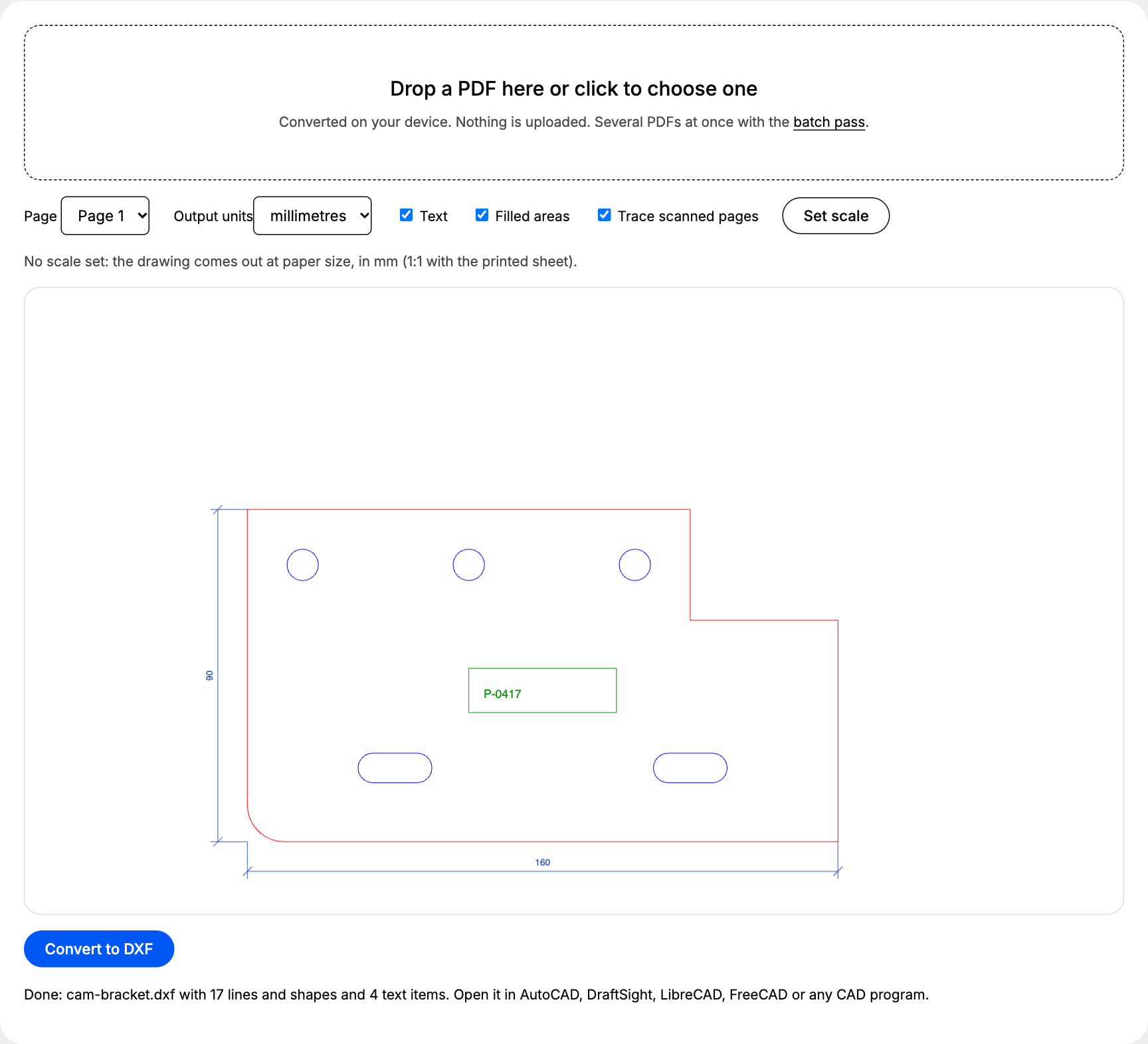
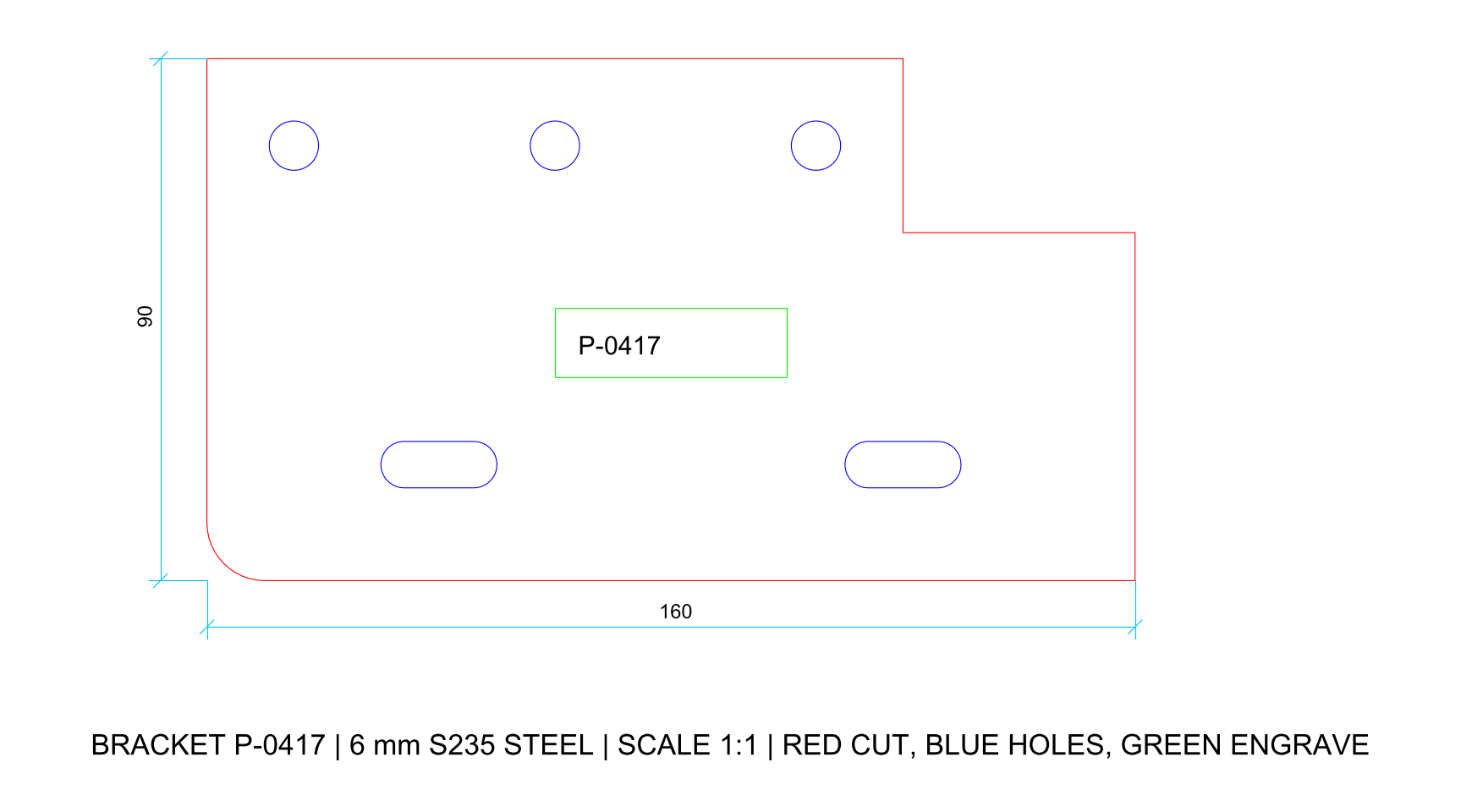
The file holds 10 LINE, 7 POLYLINE and 4 TEXT entities with 266 polyline points in all. Download both and try them in your own CAM software: cam-bracket.pdf and cam-bracket.dxf. The file you download from the live converter is byte for byte the same as this one.
Is DXF R12 bigger or smaller than a newer DXF?
Smaller. We rebuilt the same bracket geometry as DXF 2000 and DXF 2018 files with ezdxf, the open-source Python library for DXF, and compared the sizes on disk:
Same bracket, three DXF versions
| DXF R12 | 19.4 KB |
|---|---|
| DXF 2000 | 24.2 KB |
| DXF 2018 | 25.7 KB |
For a single part the gap is a few kilobytes. It matters more when a nesting program or an old controller with little memory reads hundreds of parts.
Which settings matter for CAM, laser and CNC files?
| Setting | What to choose | Why |
|---|---|---|
| Output units | The unit your CAM program assumes, millimetres or inches | R12 stores no unit, so a mismatch makes the part 25.4 times off |
| Set scale | Leave it off for 1:1 part drawings | The PDF already holds true sizes; use it only for scaled drawings |
| Text | Off for a pure toolpath file, on to keep part numbers | TEXT is a string with a height, and a CAM program has no outline to follow in it |
| Filled areas | Off | A filled shape arrives as an extra closed outline on a PDF_FILL_ layer, on top of its stroked edge, and a CAM program cuts both |
| Trace scanned pages | On | Only used when the page turns out to be a scan |
R12 or a newer DXF version?
When each DXF version fits
DXF R12 (this converter)
- Opens in old and new CAD and CAM programs
- Plain LINE, POLYLINE and TEXT entities
- Layers by colour with standard colour numbers
- Smallest file for the same geometry
DXF 2000 and later
- Needed for HATCH, SPLINE, ELLIPSE and MTEXT (added in R13)
- Lightweight polylines (LWPOLYLINE, added in R14)
- Drawing units stored in the header
- Rejected or half read by software older than the version
A PDF stores everything as paths and text, with no hatch, spline or MTEXT objects to keep, so R12 loses nothing from the page. If your office works in DWG, open the R12 file in AutoCAD or BricsCAD and save it as DWG; the PDF to DWG page walks through it.
How do you prepare the R12 file for the machine?
Three checks before you create toolpaths:
- Delete or hide the layers you will not cut. Dimension lines, centre lines and title blocks come across as real geometry, and dashed lines arrive solid. On the bracket, layer PDF_1A4CCC holds the dimensions; switch it off and only the part is left.
- Map layers to operations. Red PDF_FF0000 becomes the outer profile, blue PDF_0000FF the holes and slots to cut first, green PDF_009900 the engrave pass.
- Check one known size. Measure the overall width in your CAM program. If the bracket comes in 160 inches wide, the program assumed inches; set its import unit to millimetres, or convert again with Output units set to inches (the width then reads 6.299).
Our accuracy results show how close the converter stays on five more test drawings, and how the converter works explains each step from the PDF page to the DXF entities. For the full overview, including scaled drawings and scans, start at the PDF to DXF converter page.
Questions about pdf to dxf r12 converter
Which DXF version does the converter write?
Always DXF R12, version code AC1009 in the file header. There is no version menu: R12 is the one version that every DXF reader we know of opens, from current AutoCAD and LibreCAD to CAM software written in the 1990s.
Are circles written as CIRCLE and ARC entities?
No. A PDF stores circles as curves, and the converter writes each curve as a polyline of 12 straight segments, so a full circle has 48. On our 8.5 mm test holes that stays within 0.01 mm of a true circle. If your CAM program needs arcs for G2 and G3 moves, rebuild the holes as circles in CAD before you post the program.
My CAM program imports the file but the part is 25.4 times too big or too small. Why?
The R12 file stores numbers without a unit, so the CAM program assumes one. Pick millimetres or inches under Output units to match what your CAM software expects, and convert again.
Can I open the R12 file in a new version of AutoCAD?
Yes. Every AutoCAD release since R12 opens R12 DXF files, and so do BricsCAD, DraftSight, LibreCAD, QCAD and FreeCAD. Save it as DWG or a newer DXF afterwards if your office needs that.