PDF to DXF converter with no file upload
Drop a confidential drawing below. The converter reads it inside this browser tab and saves the DXF to your Downloads folder, so the PDF never travels to a server.
Updated 4 November 2026
Drop a PDF here or click to choose one
Converted on your device. Nothing is uploaded. Several PDFs at once with the batch pass.
PDFs to convert (every page of each, at paper size, one DXF per PDF in a ZIP):
This PDF to DXF converter with no upload reads your drawing inside the browser tab you are looking at. The PDF is opened by pdf.js, the same open-source PDF reader Firefox uses, and the DXF is written by our own code in the same tab. No server ever receives the file, which is the whole point when the drawing is a prototype, a client’s floor plan or anything covered by a non-disclosure agreement (NDA).
We did not want to ask you to take that on trust, so we logged every network request during a real conversion and then repeated it with the network switched off.
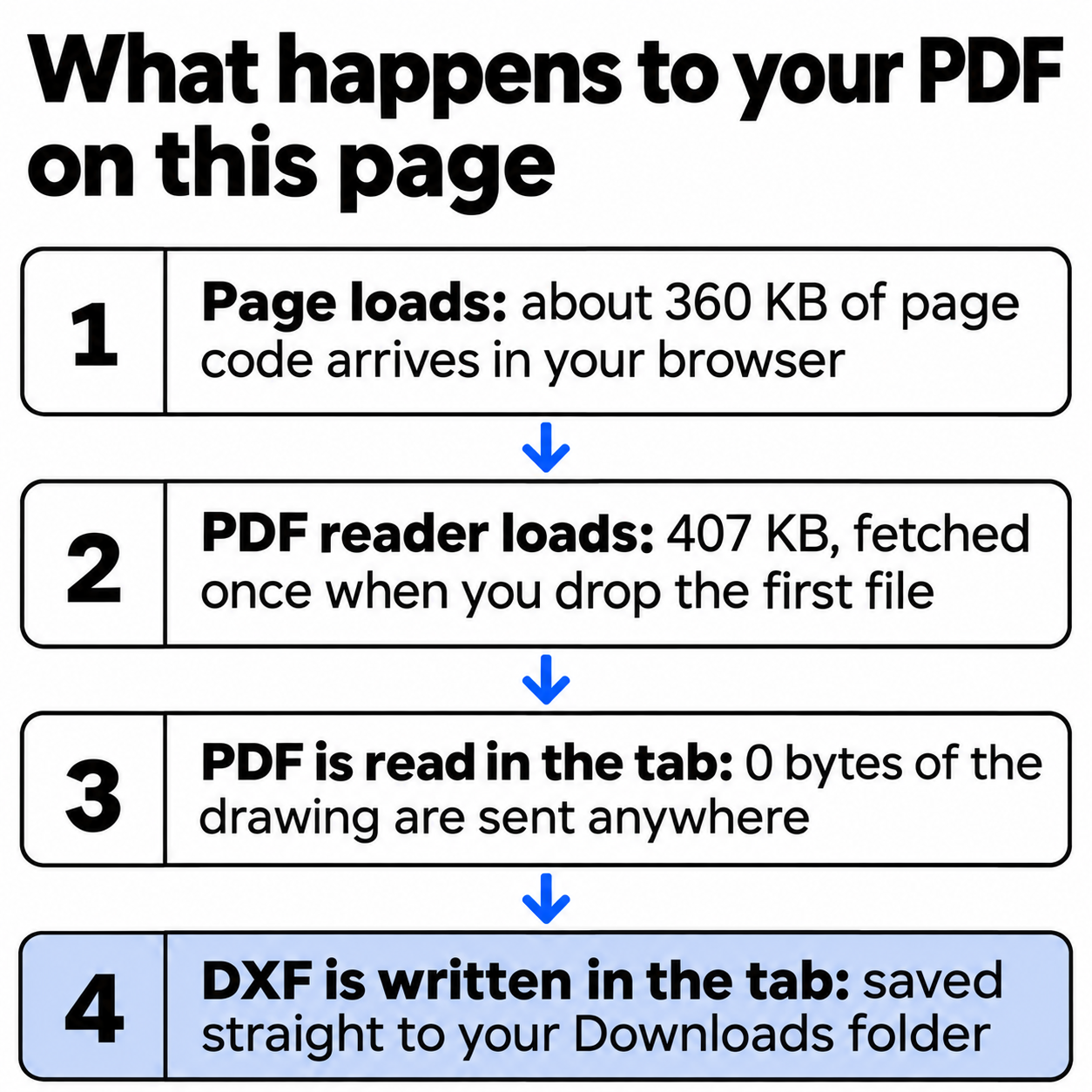
What leaves your computer when you convert?
We loaded the live converter in Chrome, logged every request from the moment the PDF was dropped until the DXF had downloaded, and waited 15 more seconds. Here is the result:
The offline run went like this: we loaded the page, dropped a first PDF so the reader was in memory, cut the network in the browser, then dropped the front panel and clicked Convert to DXF. The download arrived as usual, and a byte comparison showed it matched the online file exactly. A converter that uploads cannot do that.
| This converter | An upload converter | |
|---|---|---|
| Where the PDF is read | In your browser tab | On the service’s server |
| Copy of the drawing outside your computer | None | Stored until the service deletes it |
| Works with the network off | Yes, after the first file | No |
| Waiting time | No upload or queue | Upload, queue, download |
| What the site counts | Pages, scale used, scan traced | Up to the service |
How do you convert a confidential PDF to DXF?
- Drop the PDF on the box above, or click it and pick the file. A preview appears; choose the sheet if the PDF has several pages.
- Set the scale if the drawing is not 1:1: click Set scale, click both ends of a known dimension, type its real length and click Apply.
- Click Convert to DXF. The browser saves the file under the PDF’s own name.
What does the result look like?
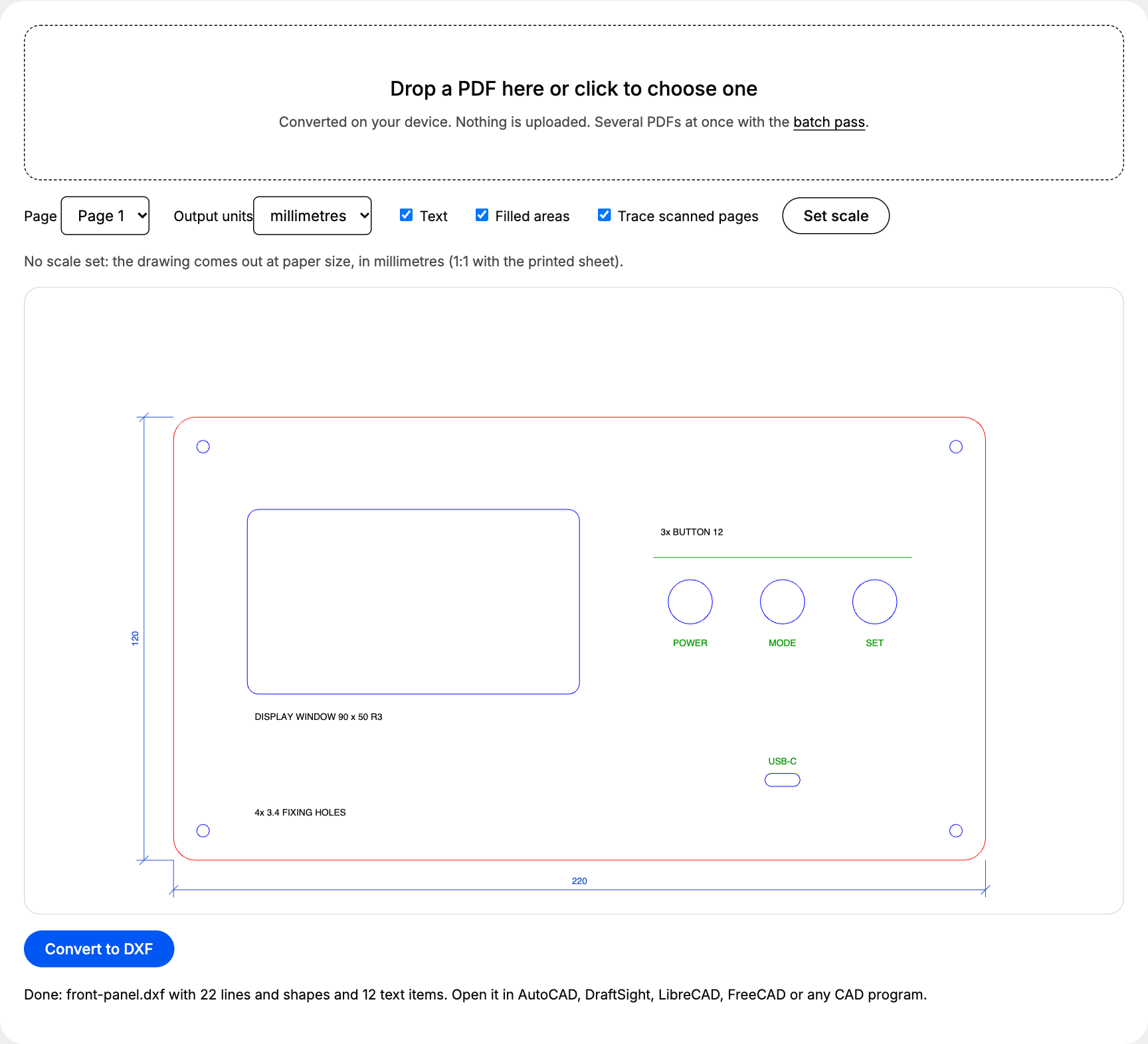
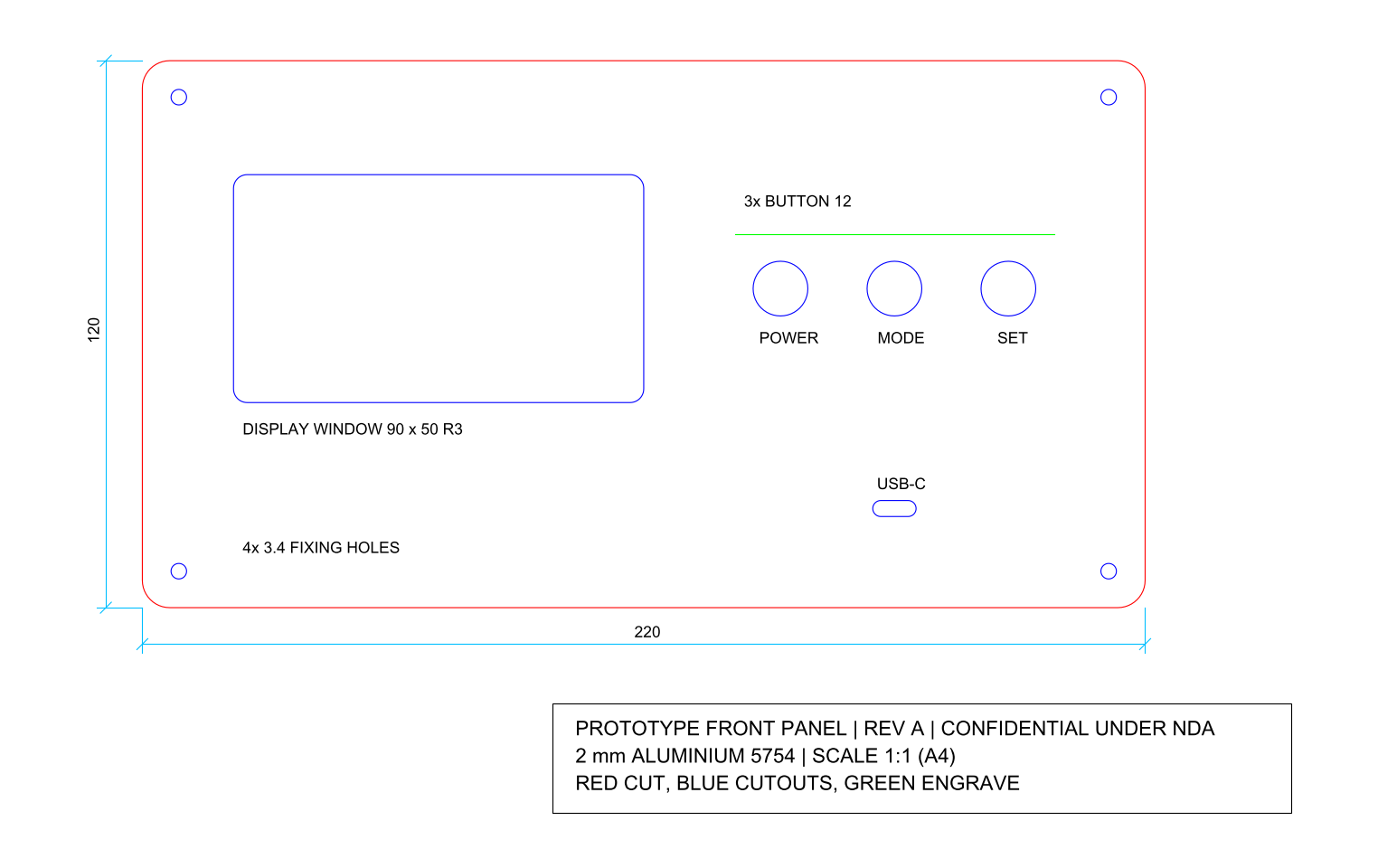
The kind of file people hesitate to upload: a front panel for an unreleased device, 220 x 120 mm in 2 mm aluminium, drawn 1:1 on A4 and marked confidential under NDA. Red is the outer cut with R6 corners, blue the cutouts (a 90 x 50 mm display window, three 12 mm button holes, a USB-C slot and four 3.4 mm fixing holes), green the engraving.
| Layer | What sits on it | Entities |
|---|---|---|
| PDF_FF0000 | Outer profile, R6 corners | 1 closed POLYLINE |
| PDF_0000FF | Display window, buttons, USB-C slot, fixing holes | 9 closed POLYLINEs |
| PDF_009900 | Engraving line | 1 LINE |
| PDF_1A4CCC | Dimension lines | 10 LINEs |
| PDF_000000 | Title block frame | 1 closed POLYLINE |
| PDF_TEXT | Labels, dimension figures, title block | 12 TEXT entities |
Measured in the DXF, the outline is 220.000 x 120.000 mm, the button holes 12.002 mm and the fixing holes 3.400 mm. Download both files and check them: front-panel.pdf and front-panel.dxf.
How can you check that nothing is uploaded?
You need about one minute in Chrome or Edge:
- Open this page, press F12 (on a Mac Cmd + Option + I) and click the Network tab.
- Drop a PDF and click Convert to DXF. Look at the Method column: a converter that uploads shows a POST request about the size of your file. Here you see a GET for
pdf.worker.min.jsand nothing that carries your drawing. - For the strict test, set the throttling menu that reads No throttling to Offline and convert a second PDF. It still works.
Firefox and Safari have the same Network panel under their developer tools.
Which settings matter for a confidential drawing?
| Setting | What to choose | Why |
|---|---|---|
| Text | Off when the DXF goes to an outside workshop | Title blocks carry project names, client names and revision notes |
| Filled areas | On | Parts drawn as fills come across as closed outlines |
| Output units | Millimetres, or inches for imperial drawings | DXF R12 stores plain numbers |
| Set scale | The longest known dimension | Drawings at 1:5 or 1:50 come out at paper size without it |
The Text switch is easy to forget: with it off, our front panel DXF loses the line confidential under NDA along with every label, and the cutting geometry stays complete.
For scans, multi-page sets and what every layer holds, the main PDF to DXF converter page covers the full picture.
Questions about pdf to dxf no upload
Is my PDF uploaded anywhere when I convert it?
No. The page loads the converter code into your browser, and the PDF is read and turned into a DXF inside the tab. In our network log of a full conversion, the only request was a download of the PDF reader, and 0 bytes of the drawing were sent.
Does the converter work offline?
Yes, once the page and its PDF reader have loaded. The reader arrives when you drop your first PDF. After that we switched the network off and converted the test panel again: the DXF came out byte for byte the same as the online one, 35,771 bytes.
Is this safe for drawings under an NDA?
The drawing stays on your computer, so no third party ever holds a copy. Check your own agreement for rules about the computer and browser you use, since those still apply. The DXF lands in your Downloads folder like any other file.
What does the site record about my conversion?
An anonymous count with three fields: how many pages, whether a scale was set and whether a scan was traced. No file name, no drawing content and no cookies. Page views are counted the same way.
Is it free?
Yes, one PDF at a time, up to 5 pages and 20 MB. The batch pass costs €12 once through PayPal and converts several PDFs into one ZIP for 24 hours, also inside the browser, with no account.