Convert PDF to DXF without installing software
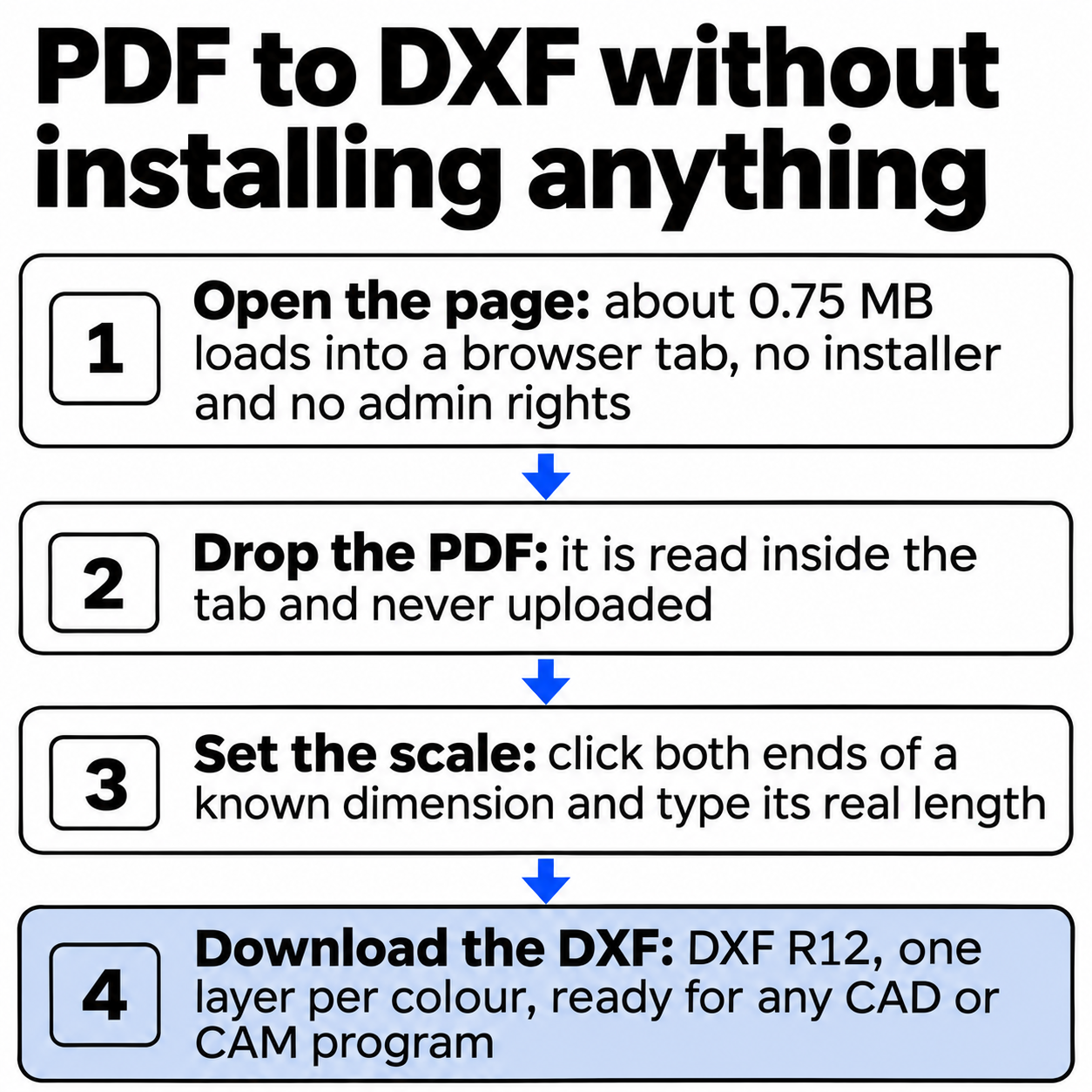
Drop the PDF below. The converter is a web page, so there is no installer, no plug-in and no admin password: the DXF downloads straight from the browser tab, at true size once you set the scale.
Updated 3 November 2026
Drop a PDF here or click to choose one
Converted on your device. Nothing is uploaded. Several PDFs at once with the batch pass.
PDFs to convert (every page of each, at paper size, one DXF per PDF in a ZIP):
You can convert a PDF to DXF without software on your computer: the converter above is a web page that loads into your browser, reads the drawing inside the tab and hands you a DXF file. Nothing gets installed, nobody asks for an admin password, and the PDF never leaves your machine. That matters on a locked company laptop, a school Chromebook, a borrowed Mac, or any time you need one DXF today and have no reason to install a CAD package for it.
What do you need to convert a PDF to DXF without software?
A current browser and the PDF. Here is what the alternatives ask you to download before the first conversion:
| Option | Before you start | Reads a PDF | Cost |
|---|---|---|---|
| This converter | 0.75 MB in the browser | Yes, to DXF R12 | Free |
| LibreCAD 2.2.1.6 | 84.6 MB installer | No | Free |
| FreeCAD 1.1.4 | 519.3 MB installer | Via DXF or SVG | Free |
| AutoCAD 2026 | 10.0 GB of disk | Yes, PDFIMPORT | Subscription |
Sizes are for Windows. The converter is free for one PDF at a time, up to 5 pages and 20 MB.
Download or disk space before the first PDF to DXF conversion
| convertpdftocad.com | 0.75 MB |
|---|---|
| LibreCAD 2.2.1.6 | 84.60 MB |
| FreeCAD 1.1.4 | 519.30 MB |
| AutoCAD 2026 | 10,000.00 MB |
LibreCAD and FreeCAD are good free programs, and you will want one of them if you edit drawings every week. LibreCAD cannot open a PDF as editable lines at all, so even after the 84.6 MB download you would still need a converter first.
How do you convert a PDF to DXF in the browser?
- Drop the PDF on the box above, or click it and pick the file. A preview appears, and a page menu shows up if the PDF has several sheets.
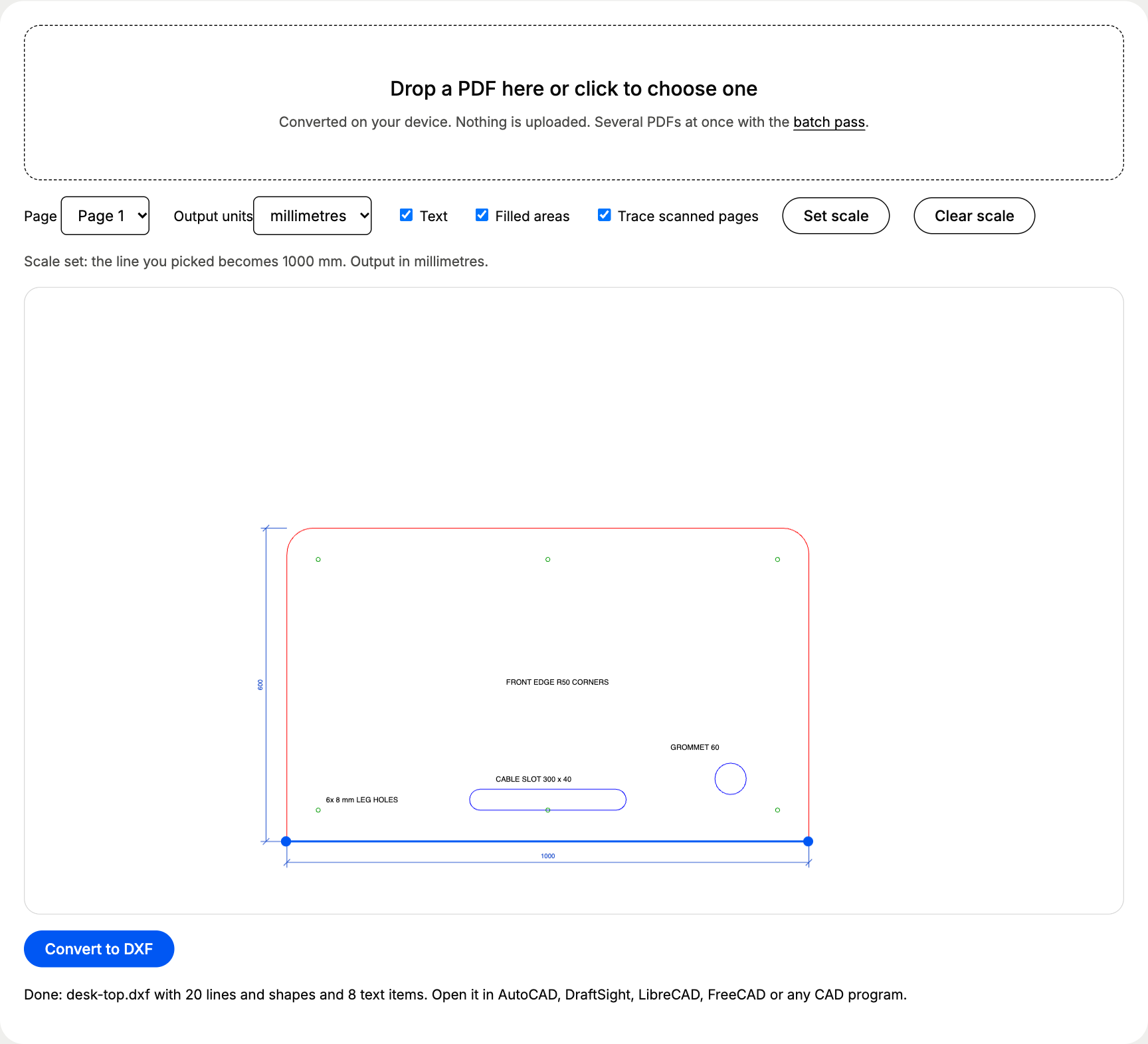
- Set the scale. Click Set scale, click both ends of a line whose real length you know, type that length and click Apply. Skip this step for drawings at 1:1.
- Click Convert to DXF. The browser saves the file to your Downloads folder, named after the PDF.
On our test file, step 3 took about 70 milliseconds from the click to the finished download.
What does a real job look like?
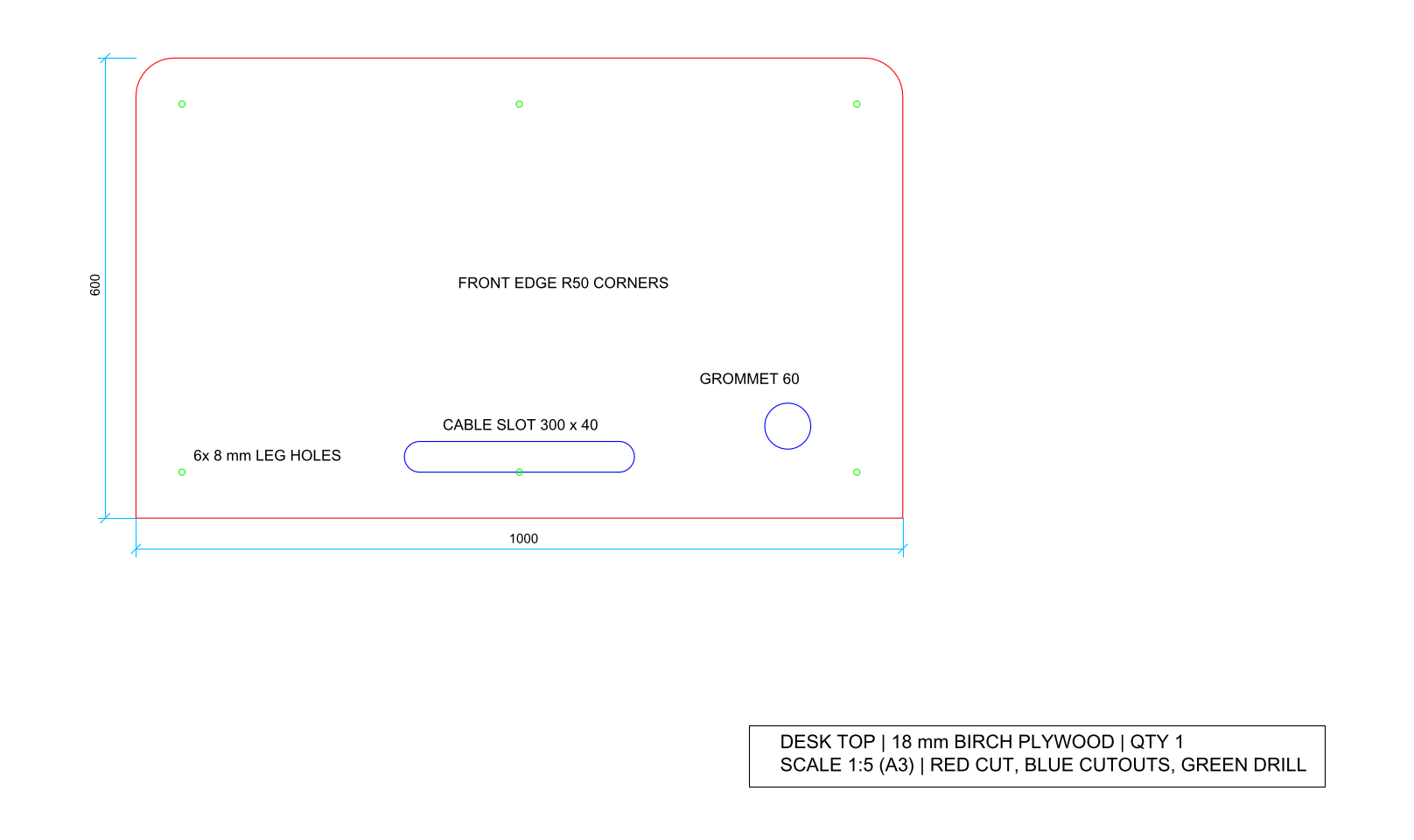
A common reason to need a DXF without CAD software: a CNC cutting service asks for a DXF, and all you have is the PDF drawing. We drew one, a 1,000 x 600 mm desk top in 18 mm birch plywood at 1:5 on A3, with rounded front corners (R50), a 60 mm cable grommet, a 300 x 40 mm cable slot and six 8 mm holes for the legs. Red marks the outer cut, blue the cutouts, green the drill holes, the way cutting services ask for it.
In the converter we clicked Set scale, picked both ends of the straight back edge and typed 1000 mm.
| Layer in the DXF | What sits on it | Entities |
|---|---|---|
| PDF_FF0000 | Outer profile with the R50 corners | 1 closed POLYLINE |
| PDF_0000FF | Cable grommet and cable slot | 2 closed POLYLINEs |
| PDF_009900 | Leg holes | 6 closed POLYLINEs, 48 segments each |
| PDF_1A4CCC | Dimension lines | 10 LINEs |
| PDF_000000 | Title block frame | 1 closed POLYLINE |
| PDF_TEXT | Labels, dimension figures, title | 8 TEXT entities |
A cutting service can assign the outer cut, the cutouts and the drill holes by layer, without redrawing anything. Download the files and try them: desk-top.pdf and desk-top.dxf. The DXF here was made with our conversion script at exactly 1:5, so the profile measures 1,000 x 600 mm.
How accurate is it without CAD software to check?
We measured both DXF files with ezdxf, the open-source Python library for DXF:
The two-click error comes from where the mouse lands: in a 1,280-pixel-wide browser window, one pixel of the preview covers about 1.9 mm of the real desk at 1:5. For a part where 0.36 mm matters, pick the longest straight edge you can find, then measure one other dimension in the result.
Which settings should you check?
| Setting | What to choose | Why |
|---|---|---|
| Output units | Millimetres, or inches for imperial drawings | DXF R12 stores plain numbers, and the cutting service reads them in the unit it expects |
| Set scale | The longest known dimension | A 1:5 drawing comes out five times too small without it |
| Text | On for a drawing you will edit, off for a file that goes straight to the machine | Labels left in a cutting file get cut as lines unless someone deletes them |
| Filled areas | On | Shapes drawn as fills with no outline need it to come across |
How do you check the DXF if you have no CAD program?
Use the reverse tool on this site: our DXF to PDF page renders a DXF back into a PDF, also inside the browser. Put the two PDFs side by side and every line, hole and label should match. Online DXF viewers that upload the file work too, as long as the drawing is not confidential.
When is installed software the better choice?
Install a CAD program when you will edit the geometry, not only pass it on: LibreCAD for 2D, FreeCAD for parts, AutoCAD 2017 or later if your office already pays for it, since its PDFIMPORT command reads PDFs directly. For everything else, including scans, multi-page sets and what each layer holds, the PDF to DXF converter page covers the full picture.
Questions about pdf to dxf without software
Do I need admin rights, a plug-in or an account?
No. The converter is an ordinary web page. It runs in any current browser, Chrome, Edge, Firefox or Safari, on a locked work laptop, a Chromebook or a Mac, without an extension, a sign-up or an installer. The browser saves the DXF to your Downloads folder like any other file.
How can I check the DXF if I have no CAD program?
Turn it back into a PDF on our DXF to PDF page, which also runs in the browser. Open that PDF and compare it with the original. We ran the desk top on this page through that round trip: the new PDF showed the same profile, cutouts, holes and text, and converting it back once more gave 1,000.000 x 599.999 mm.
Is it free?
Yes, one PDF at a time, up to 5 pages and 20 MB. For a folder of drawings, the batch pass costs €12 once through PayPal and converts several PDFs into one ZIP for 24 hours on that browser, with no account and no subscription.
Does the browser upload my drawing to convert it?
No. The page downloads the converter code to your browser once, and the PDF is read and converted inside the tab. The drawing never travels to a server, so a client drawing under a confidentiality agreement stays on your computer.
Which PDFs work without software, and which do not?
PDFs exported from CAD, Illustrator, Inkscape or a plotter driver give clean lines, curves and text. Scans and phone photos are traced into outlines instead, which works as a background to redraw over but carries about 0.4 % of error from the ink and the scanner.